procedure Imprimir;
var
 iPrinter: TPrinter;
 PrinterY: Integer;
begin
  iPrinter:= TPrinter.Create;
  PrinterY:= 0;
  iPrinter.Title:= 'MEUSISTEMA - Cupom';

  //Se a impressora estiver imprimindo, espera
  While Printer.Printing Do
  Sleep(100);

  iPrinter.BeginDoc;
  iPrinter.Canvas.Font.Name:='Courier';
  iPrinter.Canvas.Font.Style:=[fsBold];
  iPrinter.Canvas.Font.Size:=13;

  iPrinter.Canvas.Font.Size:=18;
  iPrinter.Canvas.TextOut(0,PrinterY,'CUPOM TESTE SISTEMA');
  Inc(PrinterY,38);

  iPrinter.Canvas.Font.Size:=13;
  iPrinter.Canvas.TextOut(0,PrinterY,'TESTE'); Inc(PrinterY,30);
  iPrinter.Canvas.TextOut(0,PrinterY,'--------------------'); Inc(PrinterY,30);
  iPrinter.Canvas.Font.Size:= 18;
  iPrinter.Canvas.TextOut(0,PrinterY,'OUTRO TESTE');
  Inc(PrinterY,50);

  iPrinter.EndDoc;
  iPrinter.Free;
Como acabar com o SPAM em formulários – Solução simples com HTML
É fato que muitos dos formulários, como de contato, cadastro, entre outros, são diariamente alvos de bots (robôs) pré-programados para espalharem SPAM pela internet. Uma vez que seu site esteja indexado nos buscadores, seu site se torna alvo fácil deste tipo de ataque, não se apavore, isso é algo corriqueiro de acontecer, com todo mundo.
Infelizmente, hoje, a solução adotada por grande maioria (e até por mim, até conhecer essa) era de incluir um captcha, mas os bots já conseguem interpretar as letras e números oriundos da imagem através de um processo de OCR, logo, dificultamos, colocando somas e divisões simples, o que resolveu o problema, mas acabou com a usabilidade.
Esta solução, encontrei no blog DA2K, já apliquei em um site pessoal, e realmente funcionou, pretendo começar a utilizar mais seguidamente dela, vou tornar a publicação um pouco mais didática do que a original e mostrar como a solução funciona como um todo.
Resumo
Na verdade, é muito simples: Trata-se de criar um campo no formulário em questão que seja invisível visualmente (NOTA: Você precisa utilizar um “alpha” ou “opacity” para isto, um campo do tipo “hidden” não irá funcionar), como esses bots trabalham processando somente o HTML e não o formulário visual, sempre preencherá este campo. No caso de uma pessoa, como o campo é invisível, essa pessoa não o preencherá. O outro lado da solução, se dá no backend (no processador da linguagem, seja PHP, ASP, ou o que for), basta que façamos a validação se este campo invisível foi preenchido ou não.
Origem
Segundo o autor da publicação original, ele percebeu esta solução na ferramenta MailChimp, e não é por menos, o pessoal de lá tem colaborado exponencialmente com a comunidade de desenvolvedores.
Explicando melhor
Como mencionei anteriormente, basta criarmos no nosso formulário um campo “fantasma” que não receberá nenhum valor (passará pela validação), quando um bot interpretar o HTML do formulário, tentará preencher todos os campos, inclusive este, desta forma, não passará pela nossa validação.
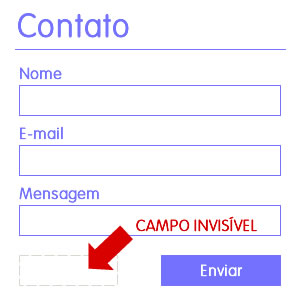
HTML:
<form method="post" ...>
...
<input type="text" id="txtInvisibleValidation" name="txtInvisibleValidation" style="display:block;width:1px;height:1px;border:0;padding:0px;background:transparent;" onfocus="document.getElementById('#txtName').focus();" />
...
</form>
A validação se dará no back-end por maior segurança (isso não quer dizer que você não possa tentar fazer no front), segue um exemplo escrito em PHP:
<?php

$nome = $_POST['txtName'];
$mail = $_POST['txtMail'];
$mensage = $_POST['txtMensage'];
$validation = $_POST['txtInvisibleValidation'];

if ($validation != '') { die('Error on validate form: you are human?!'); }

...

?>
Gostou?
Deixe seu comentário abaixo e me motive a escrever mais artigos. Se gostou muito, compartilhe.
DELPHI – Como aplicar atributos a um arquivo
Com esta dica, você pode aplicar o arquivo como somente leitura, ou então tornar o arquivo oculto.
function FileSetAttr(const FileName: string; Attr: Integer): Integer;
Exemplo:
FileSetAttr ('C:\logo.sys',0);
Onde Attr:Interger:
0=Sem Atributos;
1=Somente Leitura;
2=Oculto;
3=Somente Leitura e Oculto;
4=Sistema;
5=Somente Leitura e Sistema;
6=Sistema e Oculto;
7=Somente Leitura,Sistema e Oculto;
DELPHI – Copiar arquivos usando a ShellApi do Windows
function ProcessArquivo(const Origem, Destino : string; Operacao, Modo:Integer) : Boolean;
  // Requer a unit ShellApi na clausula uses da unit
  Const
  Aborted : Boolean = False;
  var
  shfo : TSHFileOpStruct;
  begin
  FillChar(shfo,SizeOf(shfo),$0);
  with shfo do
  begin
  if Operacao > 2 then
  begin
  operacao := 2;
  end;
  if Modo > 5 then
  begin
  modo := 1;
  end;
  case operacao of
  1: wFunc := FO_MOVE;
  2: wFunc := FO_COPY;
  end;
  pFrom := Pchar(Origem);
  pTo := Pchar(Destino);
  case Modo of
  1: fFlags := FOF_SILENT;
  2: fFlags := FOF_ALLOWUNDO or FOF_FILESONLY;
  3: fFlags := FOF_RENAMEONCOLLISION;
  4: fFlags := FOF_NOCONFIRMATION;
  5: fFlags := FOF_SIMPLEPROGRESS;
  end;
  end;
  Result := (SHFileOperation(shfo)= 0) and (not Aborted);
  end;
DELPHI – Tamanho de um arquivo
function TamArquivo(Arquivo: string): Integer;
begin
with TFileStream.Create(Arquivo, fmOpenRead or fmShareExclusive) do
try
Result := Size;
finally
Free;
end;
end;
Solução enviada por Dennis Göhlert (Berlin/German):
function GetFileSize(const szFile: String): Int64;
var
 fFile: THandle;
 wfd: TWIN32FINDDATA;
begin
 result := 0;
 if not FileExists(szFile) then exit;
 fFile := FindFirstfile(pchar(szFile),wfd);
 if fFile = INVALID_HANDLE_VALUE then exit;
 result := (wfd.nFileSizeHigh*(MAXDWORD))+wfd.nFileSizeLow;
 windows.FindClose(fFile);
end;
WP – Alterar a URL do site ou blog
UPDATE wp_options SET option_value = replace(option_value, 'http://www.antigo-dominio.com.br', 'http://www.novo-dominio.com.br') WHERE option_name = 'home' OR option_name = 'siteurl';
UPDATE wp_posts SET guid = replace(guid, 'http://www.antigo-dominio.com.br','http://www.novo-dominio.com.br');
UPDATE wp_posts SET post_content = replace(post_content, 'http://www.antigo-dominio.com.br', 'http://www.novo-dominio.com.br');
ANDROID – Chamar vídeo do YouTube
startActivity(new Intent(Intent.ACTION_VIEW, Uri.parse("http://www.youtube.com/watch?v=Hxy8BZGQ5Jo")));
Log.i("Video", "Video Playing....");
WP – Ordenando CATEGORIAS por DESCRIÇÃO
		$ucats = get_categories(array('child_of' => DAEMON_CATEGORIA_EQUIPE));
		$categories = array();
        foreach ($ucats as $cat) {
	        $categories[$cat->description]= $cat;
        }
	    sort($categories);
DELPHI – BASE 64
const
Codes64 = '0123456789ABCDEFGHIJKLMNOPQRSTUVWXYZabcdefghijklmnopqrstuvwxyz+/';

function Encode64(S: string): string;
var
i: Integer;
a: Integer;
x: Integer;
b: Integer;
begin
Result := '';
a := 0;
b := 0;
for i := 1 to Length(s) do
begin
x := Ord(s[i]);
b := b * 256 + x;
a := a + 8;
while a >= 6 do
begin
a := a - 6;
x := b div (1 shl a);
b := b mod (1 shl a);
Result := Result + Codes64[x + 1];
end;
end;
if a > 0 then
begin
x := b shl (6 - a);
Result := Result + Codes64[x + 1];
end;
end;

function Decode64(S: string): string;
var
i: Integer;
a: Integer;
x: Integer;
b: Integer;
begin
Result := '';
a := 0;
b := 0;
for i := 1 to Length(s) do
begin
x := Pos(s[i], codes64) - 1;
if x >= 0 then
begin
b := b * 64 + x;
a := a + 6;
if a >= 8 then
begin
a := a - 8;
x := b shr a;
b := b mod (1 shl a);
x := x mod 256;
Result := Result + chr(x);
end;
end
else
Exit;
end;
end;
DELPHI – Busca utilizando caracteres (COLLATE) no MS ACCESS
Sabendo-se que a busca ignorando caracteres NÃO FUNCIONA no Microsoft Access, a solução foi criar múltiplos parametros de busca, utilizando a formula a seguir (desenvolvida em Pascal).
//busca inteligente por nomes strBuscaNome:= '([mensalistas].NomeCliente LIKE "%'+strBusca+'%")'; //áäàãâÁÄÀàstrBuscaNome:=strBuscaNome+' OR ([mensalistas].NomeCliente LIKE "%'+StringReplace(strBusca,'a','á',[rfReplaceAll])+'%")'; strBuscaNome:=strBuscaNome+' OR ([mensalistas].NomeCliente LIKE "%'+StringReplace(strBusca,'a','ä',[rfReplaceAll])+'%")'; strBuscaNome:=strBuscaNome+' OR ([mensalistas].NomeCliente LIKE "%'+StringReplace(strBusca,'a','à',[rfReplaceAll])+'%")'; strBuscaNome:=strBuscaNome+' OR ([mensalistas].NomeCliente LIKE "%'+StringReplace(strBusca,'a','ã',[rfReplaceAll])+'%")'; strBuscaNome:=strBuscaNome+' OR ([mensalistas].NomeCliente LIKE "%'+StringReplace(strBusca,'a','â',[rfReplaceAll])+'%")'; strBuscaNome:=strBuscaNome+' OR ([mensalistas].NomeCliente LIKE "%'+StringReplace(strBusca,'A','Á',[rfReplaceAll])+'%")'; strBuscaNome:=strBuscaNome+' OR ([mensalistas].NomeCliente LIKE "%'+StringReplace(strBusca,'A','Ä',[rfReplaceAll])+'%")'; strBuscaNome:=strBuscaNome+' OR ([mensalistas].NomeCliente LIKE "%'+StringReplace(strBusca,'A','À',[rfReplaceAll])+'%")'; strBuscaNome:=strBuscaNome+' OR ([mensalistas].NomeCliente LIKE "%'+StringReplace(strBusca,'A','Ã',[rfReplaceAll])+'%")'; strBuscaNome:=strBuscaNome+' OR ([mensalistas].NomeCliente LIKE "%'+StringReplace(strBusca,'A','Â',[rfReplaceAll])+'%")'; //éëèêÉËÈÊ strBuscaNome:=strBuscaNome+' OR ([mensalistas].NomeCliente LIKE "%'+StringReplace(strBusca,'e','é',[rfReplaceAll])+'%")'; strBuscaNome:=strBuscaNome+' OR ([mensalistas].NomeCliente LIKE "%'+StringReplace(strBusca,'e','ë',[rfReplaceAll])+'%")'; strBuscaNome:=strBuscaNome+' OR ([mensalistas].NomeCliente LIKE "%'+StringReplace(strBusca,'e','è',[rfReplaceAll])+'%")'; strBuscaNome:=strBuscaNome+' OR ([mensalistas].NomeCliente LIKE "%'+StringReplace(strBusca,'e','ê',[rfReplaceAll])+'%")'; strBuscaNome:=strBuscaNome+' OR ([mensalistas].NomeCliente LIKE "%'+StringReplace(strBusca,'E','É',[rfReplaceAll])+'%")'; strBuscaNome:=strBuscaNome+' OR ([mensalistas].NomeCliente LIKE "%'+StringReplace(strBusca,'E','Ë',[rfReplaceAll])+'%")'; strBuscaNome:=strBuscaNome+' OR ([mensalistas].NomeCliente LIKE "%'+StringReplace(strBusca,'E','È',[rfReplaceAll])+'%")'; strBuscaNome:=strBuscaNome+' OR ([mensalistas].NomeCliente LIKE "%'+StringReplace(strBusca,'E','Ê',[rfReplaceAll])+'%")'; //íïìîÍÏÌÎ strBuscaNome:=strBuscaNome+' OR ([mensalistas].NomeCliente LIKE "%'+StringReplace(strBusca,'i','í',[rfReplaceAll])+'%")'; strBuscaNome:=strBuscaNome+' OR ([mensalistas].NomeCliente LIKE "%'+StringReplace(strBusca,'i','ï',[rfReplaceAll])+'%")'; strBuscaNome:=strBuscaNome+' OR ([mensalistas].NomeCliente LIKE "%'+StringReplace(strBusca,'i','ì',[rfReplaceAll])+'%")'; strBuscaNome:=strBuscaNome+' OR ([mensalistas].NomeCliente LIKE "%'+StringReplace(strBusca,'i','î',[rfReplaceAll])+'%")'; strBuscaNome:=strBuscaNome+' OR ([mensalistas].NomeCliente LIKE "%'+StringReplace(strBusca,'I','Í',[rfReplaceAll])+'%")'; strBuscaNome:=strBuscaNome+' OR ([mensalistas].NomeCliente LIKE "%'+StringReplace(strBusca,'I','Ï',[rfReplaceAll])+'%")'; strBuscaNome:=strBuscaNome+' OR ([mensalistas].NomeCliente LIKE "%'+StringReplace(strBusca,'I','Ì',[rfReplaceAll])+'%")'; strBuscaNome:=strBuscaNome+' OR ([mensalistas].NomeCliente LIKE "%'+StringReplace(strBusca,'I','Î',[rfReplaceAll])+'%")'; //óöòõôÓÖÒÕÔ strBuscaNome:=strBuscaNome+' OR ([mensalistas].NomeCliente LIKE "%'+StringReplace(strBusca,'o','ó',[rfReplaceAll])+'%")'; strBuscaNome:=strBuscaNome+' OR ([mensalistas].NomeCliente LIKE "%'+StringReplace(strBusca,'o','ö',[rfReplaceAll])+'%")'; strBuscaNome:=strBuscaNome+' OR ([mensalistas].NomeCliente LIKE "%'+StringReplace(strBusca,'o','ò',[rfReplaceAll])+'%")'; strBuscaNome:=strBuscaNome+' OR ([mensalistas].NomeCliente LIKE "%'+StringReplace(strBusca,'o','õ',[rfReplaceAll])+'%")'; strBuscaNome:=strBuscaNome+' OR ([mensalistas].NomeCliente LIKE "%'+StringReplace(strBusca,'o','ô',[rfReplaceAll])+'%")'; strBuscaNome:=strBuscaNome+' OR ([mensalistas].NomeCliente LIKE "%'+StringReplace(strBusca,'O','Ó',[rfReplaceAll])+'%")'; strBuscaNome:=strBuscaNome+' OR ([mensalistas].NomeCliente LIKE "%'+StringReplace(strBusca,'O','Ö',[rfReplaceAll])+'%")'; strBuscaNome:=strBuscaNome+' OR ([mensalistas].NomeCliente LIKE "%'+StringReplace(strBusca,'O','Ò',[rfReplaceAll])+'%")'; strBuscaNome:=strBuscaNome+' OR ([mensalistas].NomeCliente LIKE "%'+StringReplace(strBusca,'O','Õ',[rfReplaceAll])+'%")'; strBuscaNome:=strBuscaNome+' OR ([mensalistas].NomeCliente LIKE "%'+StringReplace(strBusca,'O','Ô',[rfReplaceAll])+'%")'; //úüùûÚÜÙÛ strBuscaNome:=strBuscaNome+' OR ([mensalistas].NomeCliente LIKE "%'+StringReplace(strBusca,'u','ú',[rfReplaceAll])+'%")'; strBuscaNome:=strBuscaNome+' OR ([mensalistas].NomeCliente LIKE "%'+StringReplace(strBusca,'u','ü',[rfReplaceAll])+'%")'; strBuscaNome:=strBuscaNome+' OR ([mensalistas].NomeCliente LIKE "%'+StringReplace(strBusca,'u','ù',[rfReplaceAll])+'%")'; strBuscaNome:=strBuscaNome+' OR ([mensalistas].NomeCliente LIKE "%'+StringReplace(strBusca,'u','û',[rfReplaceAll])+'%")'; strBuscaNome:=strBuscaNome+' OR ([mensalistas].NomeCliente LIKE "%'+StringReplace(strBusca,'U','Ú',[rfReplaceAll])+'%")'; strBuscaNome:=strBuscaNome+' OR ([mensalistas].NomeCliente LIKE "%'+StringReplace(strBusca,'U','Ü',[rfReplaceAll])+'%")'; strBuscaNome:=strBuscaNome+' OR ([mensalistas].NomeCliente LIKE "%'+StringReplace(strBusca,'U','Ù',[rfReplaceAll])+'%")'; strBuscaNome:=strBuscaNome+' OR ([mensalistas].NomeCliente LIKE "%'+StringReplace(strBusca,'U','Û',[rfReplaceAll])+'%")'; //çÇ strBuscaNome:=strBuscaNome+' OR ([mensalistas].NomeCliente LIKE "%'+StringReplace(strBusca,'c','ç',[rfReplaceAll])+'%")'; strBuscaNome:=strBuscaNome+' OR ([mensalistas].NomeCliente LIKE "%'+StringReplace(strBusca,'C','Ç',[rfReplaceAll])+'%")';